Important information about NXAccounts' reporting - everythiung is previewed
You may think that all 'reports' will be printed directly to your printer. This is not the case. The app will always output the report as a preview to your screen first. And this preview displays the report exactly as it is will be printed on paper. From there, you may choose to print all, or a range of pages. Or you may export the report to PDF, Word, Excel or a few other formats.
Report Language choices
NXAccounts are often used by projects and partners where their donors, supporting agencies or organizations speak a different language than that of the project country. To facilitate optimal understanding for both parties BushSoft provides both native and foreign Account Name languages and also selectable Report title Languages. Hence both parties may enjoy understanding accounting data in their own language!
Accounts name language
You already know that all accounts and dimensions have fields for 'Native name' and 'Foreign name'. Like on the Tables and Settings forms the Account Language control are found in the center of the Reporting form's footer panel. Here you may choose which of the two account languages (native or foreign) which will be displayed in the reports. Nothe though that transaction texts are native language only (due to the fact that local accountants may not speak or understand the foreign foreign languages.
Report title language
You may find this control near the middle of the left hand panel. Feel free to checkout the difference for the various reports.
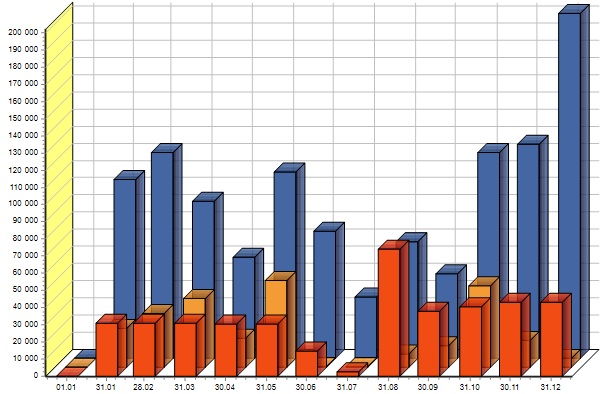
We have also included some graphical reports....
Like this one:
Please take to opportunity to visit this page for further details.
The Reporting Window's left panel has several controls common to most report types.
Table to print
If this dropdown list is available then you may select from which 'dimension' you want to display data, either mainbook accounts, accounts receivables/payables or any of your extra dimensions.
Show used accounts only
If this control is available you may choose whether or not to print unused accounts/dimensions (not yet used in any transaction and have no opening balance).
Period from and to
If these controls are available you may choose for which period interval the report's figures are calculated from.
Selecting accounts - a range or a selection
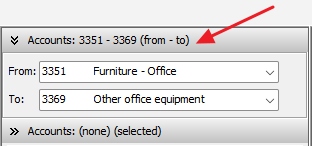
Many reports requires selecting accounts (or your Table to print selection). You have the option to select a range (from - to) by using the upper panel (see below):
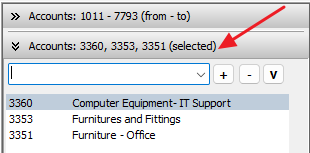
Or, if you need to select arbitrary accounts you click on the Selected panel and select accounts one by one in the dropdown list. If you need to remove entries from the list you click the minus (-) button:
Filtering reports by dimensions
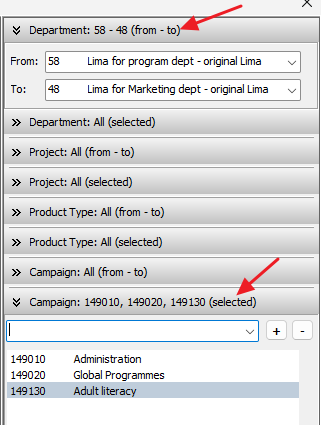
This is the main advantage of a Multi-Dimensional accounting system where you have multiple departments and projects. By using the below filtering feature you may select any dimension combination and your reports will only accumulate transactions assigned to the selected dimension(s).
As with the above accounts example you may either select a consecutive range (upper arrow below) or an arbitrary list of selected dimensions (lower arrow below).