Adding or Editing Exchange rates
To learn more about this app's basic functions when editing data, please click here ...
Dynamic or static exchange rates throughout the year?
Depending on your policies you may either want to just enter the exchange rate(s) for your foreign currencies on January 1st and keep them fixed for the whole fiscal year OR you may update your foreign exchange rates each time you receive funding from abroad. Please discuss with your fundraiser which policy they want you to apply.
When do I add a new exchange rate?
Most customers enter a new exchange rate on the same day they receive funding transfers (most often via bank) from donor organisations. In this case the exchange rate will more or less follow the 'real' value of the amount transferred including any inflation fluctuations.
Why exchange rates?
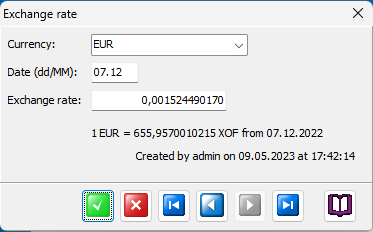
In order to calculate the correct exchange rate between the transaction (voucher) currency and a foreign currency for a certain day you may update or add exchange rates up to one per day. This is also the reason why the fixed exchange rate for the transaction currency itself always will be 1.0000000000.
Need exchange rates from January 1st..
It is mandatory to verify or enter correct exchange rate values for January 1st for ALL foreign currencies. Otherwise the app will not have a sensible way of displaying lists and reports in foreign currencies.
Validity period
If you enter an exchange rate for February 3rd it will be used for all transactions from this date and up to a new exchange rate is registered from a later date.
Exchange rate value
You may calculate the exchange rate like this: Transferred amount in foreign currency DIVIDED BY Obtained amount in transaction currency EQUALS Exchange rate value.
NOTE
The BUDGET exchange rate for the foreign currencies is fixed throughout the year and can be modified in the Settings / Currencies tabsheet.