Now you have created an empty accounting, but no accounts, no budget. Nothing but empty tables.
So please open the Main Window / Settings / Accounts Settings tab
Now you have at least two options:
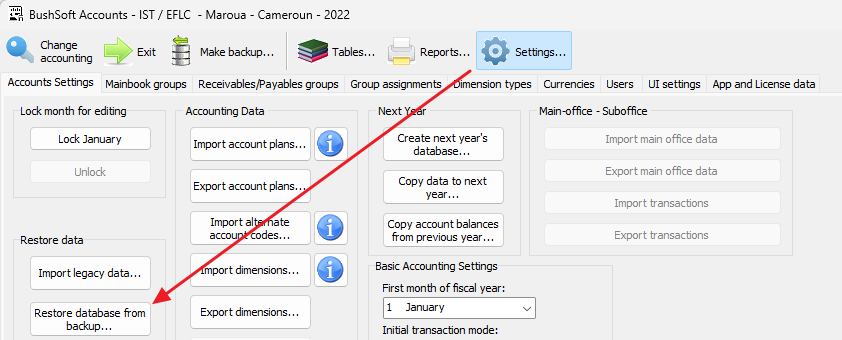
1. If you are lucky and have received a prepared backup, please RESTORE it using the button below:
NOTE: If we have prepared and initial or converted backup for you, its default admin user password will always be "aaaa". Please change this default admin password as soon as you get your accounts into production.
Locate and click the above button. The Open file dialog will appear. Please browse to the folder you saved the backup and doubleclick the backup file to restore it. In this case you may skip the steps below and proceed directly to "Managing the 'Tables' window"
2. If you have no backup and just want to IMPORT a basic accounts plan as a point of departure by following these steps:
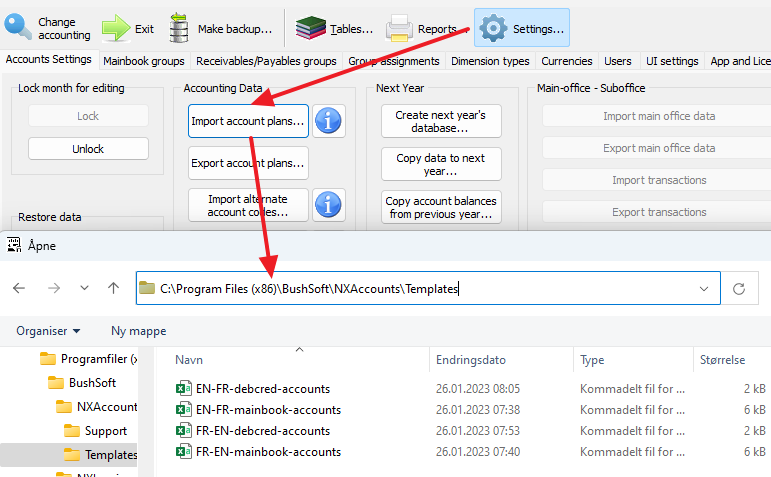
We have prepared some basic account hierarchy for you. They are in the CSV file format and editable with Excel if you want.
Please click the 'Import accounts plans' button and with the 'Open' dialog, browse to the "C:\Program Files (x86)\Bushsoft\NXAccounts\Templates" folder.
NOTE: You may also want to export the accounting plan from another running accounting using the buttons below and import that exported file as a point-of-departure for your new accounting.
You may even modify the exported file contents manually in Notepad before importing it into the new accounting! However be aware of the strict file format with delimiter characters. Click the round 'i' button beside the 'Import account plans...' button for ore info about the format.
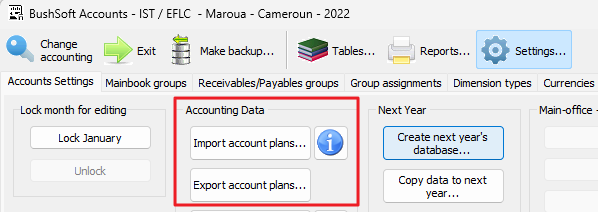
In that case you may not want to import most of the named accounts payables / reveivables accounts:
Select files with the main/foreign language combination that suits your license and import both the mainbook and debcred templates.
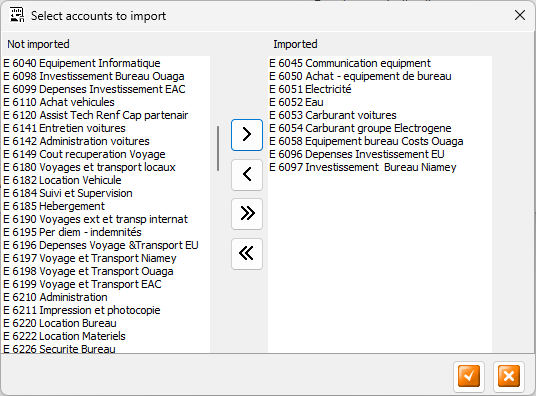
During the process you may deselect accounts or sub groups that you do not want. Click the Move to Right or Move to Left until you have selected what you need.
Make sure although that you always have to at least keep the four Mainbook ROOT account groups: Assets, Debts, Incomes and Expenses.