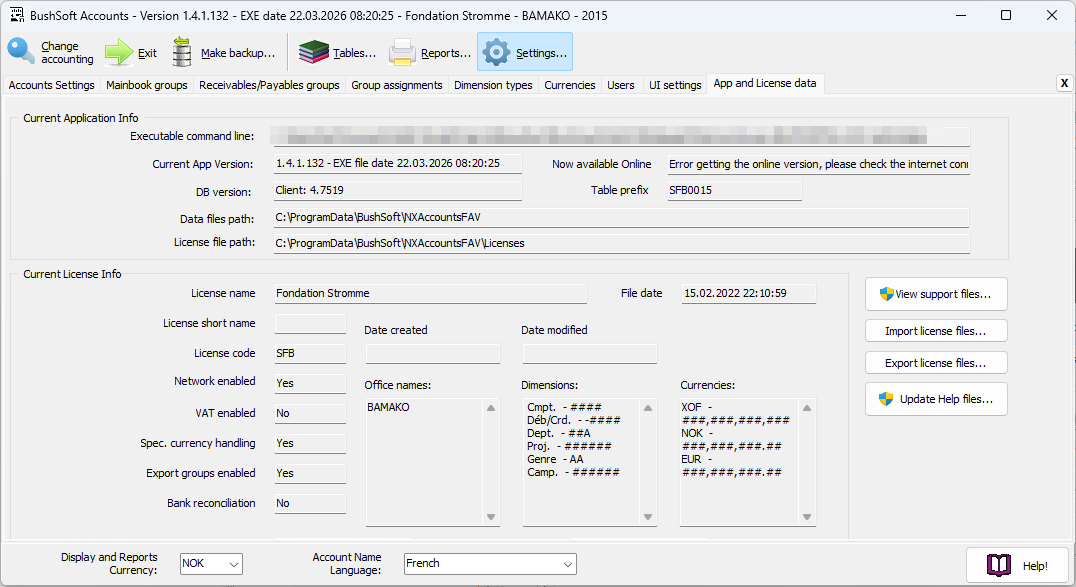
Application properties
Below the line displaying the NXAccounts application's current command line and parameters you see its version number and production date.
Always make sure you frequently check for new or updated versions of NXAccounts to download and install them.
License properties and data
Many properties like languages and currencies are defined in your licenses and they are not user-editable. If you need any of these properties changed, please contact dev@bushsoft.com. Please note that most of the settings can only be changed before creating a new year.
Help system and user manuals
We are still evaluating NXAccounts' help system and translators. However new contents are added or renewed every week, so please frequently click the 'Update Help Files....' button to download your latest version of these resources.
You will find the updated PDF user manuals in NXAccounts' native and foreign language here:
C:\Program Files (x86)\BushSoft\NXAccounts\Support
NOTE:
Close any open PDF or Help windows before trying to download the above mentioned resource files.