Adding or Editing Accounts Payables / Receivables
To learn more about this app's basic functions when editing data, please click here ...
As the Accounts Payables / Receivables most often addresses companies and people they store different data than the mainbook accounts.
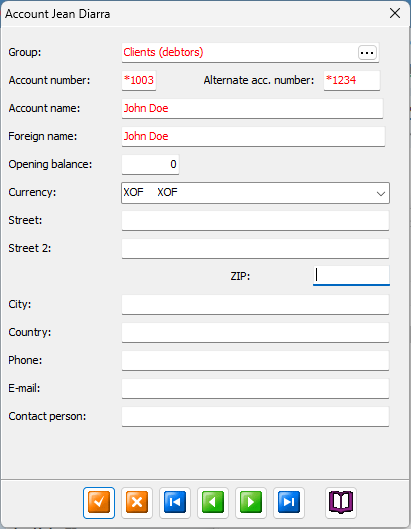
Account group
This is the account groups in which this account's transactions will be accumulated into. This type of accounts are always 'Balance' (red color i tree view).
Account number
The number of digits of your accounts receivables / payablesare defined in your license, you can check all your numbering masks, languages and other stuff in Settings / App and License data tab.
Alternative number
If you are reporting to an overseas fundraiser or donor, chances are they are using another account plan numbering scheme that you do. So here you may enter (or receive from them) alternative account numbers which suit their need.
Account name
Enter the name of the account here, remember you can use national accounting numbering and names schemes which normally are publicly available in your country or area.
Foreign account name
If you are reporting to an overseas fundraiser or donor, you may add (or receive from them) the account name in their language. Together with the alternative account number feature (above) this enables them to read your accounting reports in their own language using their own account numbering scheme.
Opening balance
Make sure you enter the correct opening balance here. It must be an exact match with the previous year's FINAL closing balance. If this is not your first year using NXAccounts you can automatically update these balances by clicking the 'Copy account Balances from previous year...' button in Settings / Account settings tab
Currency
This field is not in use at the moment.
The Address, phone numbers and email address fields are self explanatory, they are not used in calculations or reports.