Precaution!
In order to always keep an updated copy of ALL your accounting data, please make sure you click the Main window's Backup button after every session when you have changed or added data to your accounts.
If you should encounter strange error messages from the app (for example caused by sudden power outage while the app was in the middle of a database operation etc) please follow these steps:
1. If you are allowed to backup your current accounting, please do that.
2. Then immediately restore the same backup into your accounting again.
Why? The restore process rewrites ALL table data and indexes properly so you know your data will be 'clean'.
Error message when opening accounting
Due to computer failures or power cuts during saving, your accounting database may i very rare cases become corrupted. If you run into such a situation your accounting may refuse to open as normal. HOWEVER, you may still be allowed to enter the correct password and then click the cogwheel which appears below the 'Change database... button:
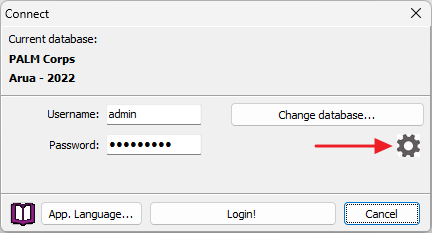
'Emergency operations'
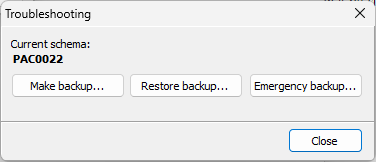
In the 'Emergency' dialog that opens you will be able to restore the currently selected accounting by clicking the Restore backup button below. Hopefully this brings you back on track again.... But please be aware that this will replace your current accounting with the version from the backup your restore. Hence our advice about to take frequent backups so you don't loose much of your work during a restore operation.
If none of these suggestions solve your problem(s),
please do not hesitate to contact support@bushsoft.com!