Don't forget to enter the initial (January 1st) exchange rates for ALL your foreign currencies..
Go to Main Window / Tables / Exchange rates tab and doubleclick each of the foreign currency rows which have 1.0000 as exchange rate as of January 1st.
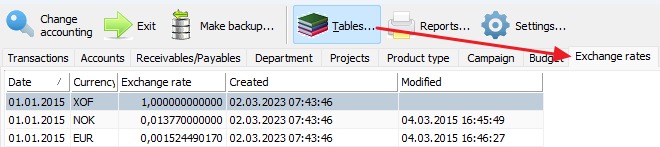
... and enter the exchange rate value you want the app to use from january 1st:
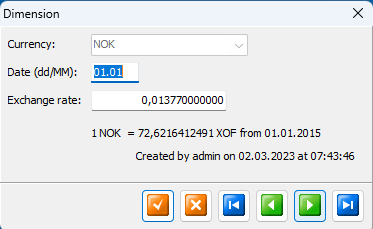
Save your changes (left 'V' button) for each foreign currency you modified!
Set your fixed budget foreign currency exchange rate (important)
Your budget's foreign exchange rates should not be dynamic as this will lead to confusion when printing result reports from different periods. So, in order to define the budget exchange rates, please goto
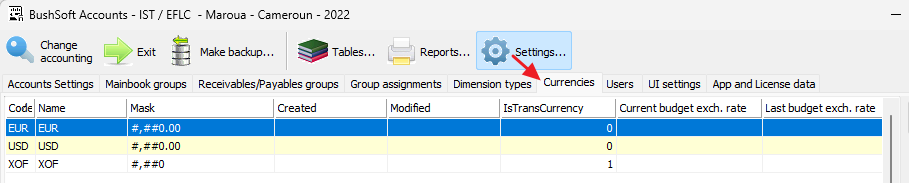
And doubleclick the desired currency to enter its budget currency exchange rate:
Currency properties
To learn more about this app's basic functions when editing data, please click here ...
The currency name, code and masks are non-editable and defined in the License. See App and License data tabsheet.
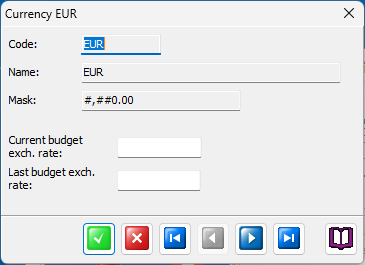
Current budget exchange rate
If you leave this field empty then any foreign currency reports containing Budget columns will display the foreign currency's exchange rate as of January 1st.
If this doesn't suit your situation then enter your preferred yearly Budget exchange rate with appropriate precision in this field.
Last budget exchange rate
If you need to note (or beware of) the last used budget exchange rate, please copy and paste it into this field. This field is just for your convenience only, it is not used in any app calculations...