Your every-day login window looks more or less like the screenshot below. The license, year, office and username are remembered from your last session. So to continue where you left it's only to enter your password and click the 'Login!' button.
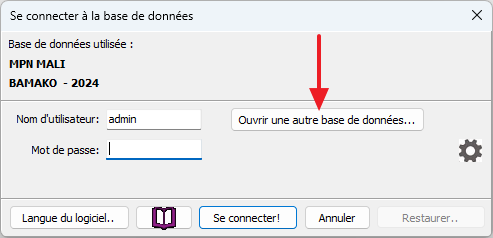
However, if you need to open another accounting (or create a new year), please click the 'Change database' button (see red arrow above). Then the 'extended' login window will open:
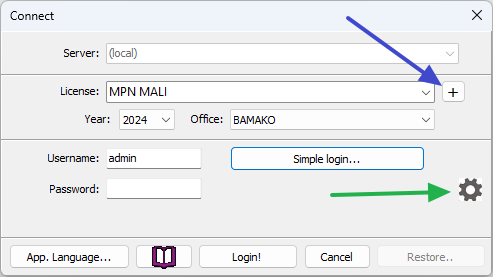
Above you may select any other License name, Office and/or Year for which you have licenses. You open it by clicking the 'Login!' button. If you don't find the desired accounting name or year in the dropdown lists you need to contact sales@bushsoft.com to order additional license(s). When you receive the license file(s) you may click the '+' button at the right hand side of the 'License' line (blue arrow) to properly import and activate them.
Forgotten or lost password?
If you recently have changed your password and cannot remember it you will get this warning:
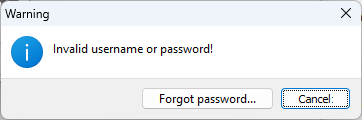
We really encourage you to squeeze your brain a few times more before giving up and click the 'Forgot password...' button. In that case another window will pop up with a long code that needs to be copied to your clipboard and pasted into an email message that you must send to support@bushsoft.com. We will then as soon as possible provide you with an unlock code to be pasted into the same form which enables you to enter a NEW password for the current accounting.
Error message(s) when opening accounting
Due to disk failures or power outages, your accounting database may become corrupted. It is therefore very important to create frequent backups of your accounts - preferably after each session where you have added or modified content.
If you find yourself in a situation where it is impossible to open your accounting, you can always enter the correct password and click on the cogwheel (green arrow in login window above) located under the 'Change database...' button.
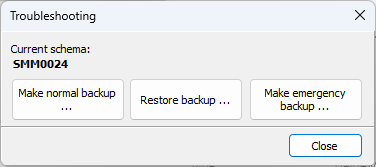
From the dialog which opens (above) you will be able to restore the selected accounting by navigating to open your last backup file.
We hope this information will help you out.
Otherwise, please contact support@bushsost.com so we can guide you in this situation.